




My Personal AI-Generated Podcast - Local AI Models and qwen3-TTS.
Table of Contents
Genesis: creatio ex nihilo? - My LOCAL AI-generated Podcast
Okay, fine. It’s not really a proper podcast. It’s a monologue generated by an AI, based on the text of my blog. A real podcast would of course be much cooler, but J. and I will have to get our act together for that. Until then, every post on my blog is also available as audio — I call it a shortcast, which is obviously brilliant — and it can be accessed via the RSS feed. The whole thing is generated completely locally on my computer/server, without requiring an internet connection!
Whenever I tell people that everything runs locally, I get the impression that they think that means the same thing as using cloud services. Then I get replies like: “Yeah, but I can do that with NotebookLM” or “ElevenLabs can do that too, right?”
I really feel that the value of local computing is massively underestimated in public discourse. It’s not just a matter of privacy, but also about control over your own data and independence from external services. That’s why I want to go into a bit of technical detail here, so that maybe one or two people will understand why local AI is so cool and what it can already do today.
The setup
The hardware
You may already know my mini PC running Bazzite. Here’s the article about it. It’s now running CachyOS.
That’s all I have, and it’s all I need to create my AI-generated podcasts. It’s amazing how capable this hardware is if you’re willing to give it time.
The important thing here is not raw peak performance, but that the entire pipeline runs stably and reproducibly. That’s exactly what makes local AI so appealing to me: I can run the same chain again and again, tweak it, and improve it without relying on any external provider.
The software
For text generation, I use Ollama on my server with Open WebUI as the API. There I first generate a podcast script from my blog posts, optimized in tone and length for sensible audio output. Depending on the task, I use gemma4 or the model I trained or adapted myself for script generation. Everything runs locally on my network and remains fully under my control.
For speech synthesis, I use qwen3-TTS on the mini PC. What makes this especially cool is that I use my own cloned voice for the podcast. That makes the output much more personal and much closer to what I would consider fitting. It’s a pretty strange feeling hearing your own texts spoken in your own voice, but that’s exactly what makes the effect so strong.
The actual orchestration runs through n8n. The workflow automatically pulls the RSS feeds of my blog posts, checks whether a text or audio file already exists for a given post, creates the script if needed, generates the audio output from it, and stores the result back in my GitHub repository. The finished MP3 is then fed back into the feed and optionally sent via Telegram.
The workflow
The workflow is designed to require as little manual intervention as possible. First, it fetches the RSS feed, then extracts the individual article links and processes them in batches. If neither audio.txt nor audio.mp3 exists, the post is processed; otherwise it is skipped. That saves time and prevents the same article from being rendered unnecessarily more than once.
Next, a podcast script is generated from the article text and saved to GitHub. Then the TTS part starts: the text is split into speakable units, audio is generated for each chunk, and the pieces are stitched back together with ffmpeg. That chunking step is crucial, because very long input texts can otherwise cause qwen3-TTS to produce rough or messy output.
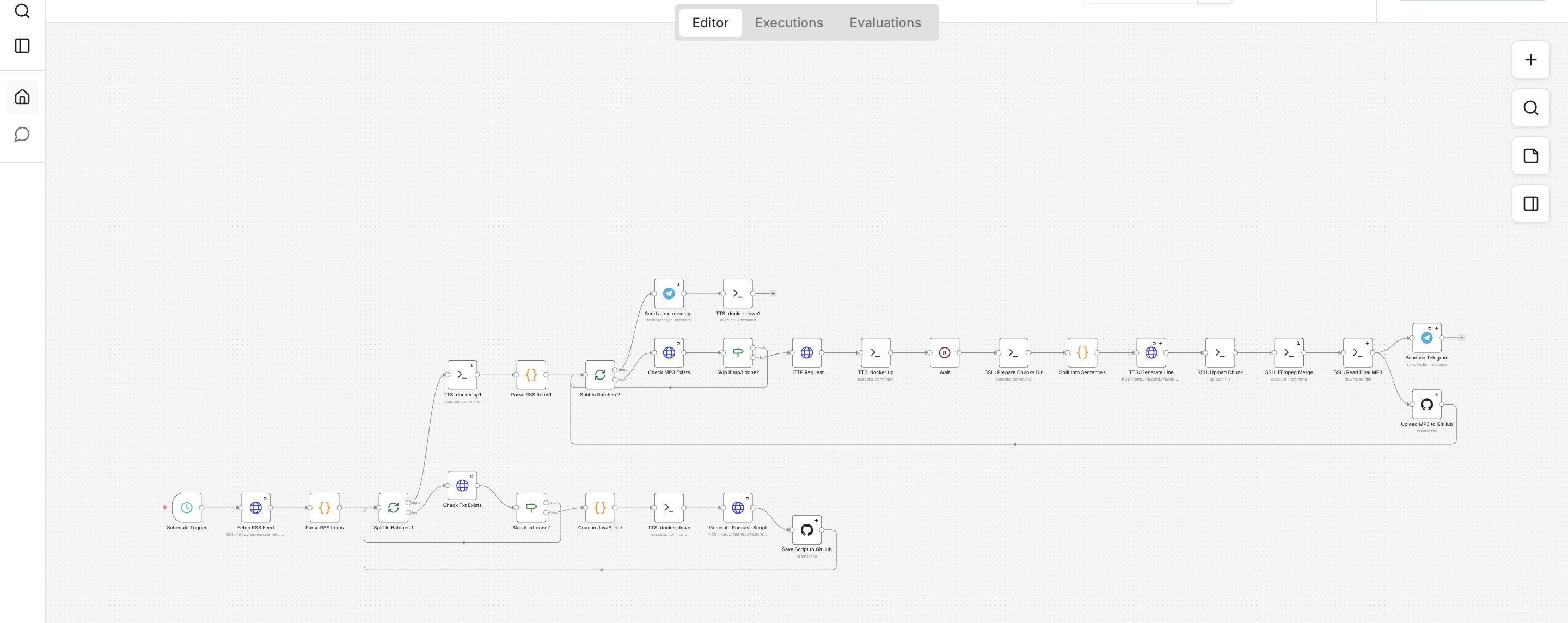
┌─────────────────────── n8n Workflow: Blog → Podcast ───────────────────────┐
│                                                                              │
│  [Schedule]                                                                  │
│      │                                                                       │
│      ▼                                                                       │
│  [Fetch RSS Feed]                                                            │
│      │                                                                       │
│      ▼                                                                       │
│  [Parse RSS Items]                                                           │
│      │                                                                       │
│      ▼                                                                       │
│  [Split In Batches #1]                                                       │
│      │                                                                       │
│      ├──────────────► [Check TXT exists?] ── yes ──► [Next Article]          │
│      │                         │                                               │
│      │                         no                                              │
│      │                         ▼                                               │
│      │                 [Clean Description]                                     │
│      │                         │                                               │
│      │                         ▼                                               │
│      │              [Generate Podcast Script]                                  │
│      │                         │                                               │
│      │                         ▼                                               │
│      │                [Save Script to GitHub]                                 │
│      │                                                                       │
│      ▼                                                                       │
│  [Split In Batches #2]                                                       │
│      │                                                                       │
│      ├──────────────► [Check MP3 exists?] ── yes ──► [Next Article]          │
│      │                         │                                               │
│      │                         no                                              │
│      │                         ▼                                               │
│      │                    [Start TTS Docker]                                   │
│      │                         │                                               │
│      │                         ▼                                               │
│      │                        [Wait]                                           │
│      │                         │                                               │
│      │                         ▼                                               │
│      │                [Prepare Chunk Folder]                                   │
│      │                         │                                               │
│      │                         ▼                                               │
│      │                 [Split Into Sentences]                                  │
│      │                         │                                               │
│      │                         ▼                                               │
│      │                 [TTS Generate Chunk]                                    │
│      │                         │                                               │
│      │                         ▼                                               │
│      │                  [Upload Chunk via SSH]                                 │
│      │                         │                                               │
│      │                         ▼                                               │
│      │                   [FFmpeg Merge MP3]                                    │
│      │                         │                                               │
│      │                         ├──────────► [Send via Telegram]               │
│      │                         │                                               │
│      │                         └──────────► [Upload MP3 to GitHub]            │
│      │                                                                         │
│      └──────────────────────────────────────────────► [Stop TTS Docker]       │
│                                                                              │
└──────────────────────────────────────────────────────────────────────────────┘
The problem with long texts
With longer texts, I noticed that qwen3-TTS would eventually produce strange, almost body-horror-like sounds — more gurgling than clean speech. The model apparently handles overly long passages less well when everything is fed into it in one go. That’s why I deliberately split the text into smaller pieces and generated the segments separately.
That ended up being the decisive improvement. Instead of synthesizing one large block, I split the text into natural speech segments, following sentence boundaries and small chunks. The result sounds much more stable, more natural, and above all more understandable. It also makes it much easier to control where pauses, pacing, or emphasis should shift.
The results
Here is a gemma4-generated script for one of my blog posts, which serves as the basis for the TTS output:
Ich zeig euch heute mal, wie man Gameboy-Spiele für die Bildungs- und Pastoralarbeit einsetzen kann, um die Motivation beim Lernen so richtig zu steigern. Ich bin ja ein großer Fan von Retrospielen, und vor drei Jahren kam mir die Idee, das Ganze mal mit Gamification in meiner App für die Firmvorbereitung, der feiafanga App, zu kombinieren. Dabei bin ich auf GB Studio gestoßen. Das ist ein tolles, kostenloses Tool, mit dem man ohne Programmierkenntnisse echte Gameboy-Spiele erstellen kann, die sogar auf originaler Hardware laufen. Man kann sie aber auch als HTML fünf exportieren, sodass sie direkt im Browser funktionieren.

Wenn ihr selbst so ein Spiel bauen wollt, braucht ihr im Grunde ein paar Dinge. Erstens das GB Studio und zweitens Grafiken, also Assets, die man selbst zeichnet oder kostenlos im Netz findet. Dann braucht ihr Musik und einen Emulator, um das Ganze zu testen. Ganz wichtig ist natürlich die Story, die im Bildungskontext einen klaren Bezug zum Thema haben muss. Für die Level-Erstellung empfehle ich euch LDtk, das ist ebenfalls kostenlos und sehr einfach zu bedienen.

Ich hab das Ganze mal an einem Beispiel umgesetzt. In meinen Spielen geht es um die sieben Gaben des Heiligen Geistes. Die Hauptfigur Eli ist auf dem Weg zur ersten Firmstunde und muss dabei verschiedene Aufgaben lösen. In einer Szene geht es zum Beispiel um die Gabe der Erkenntnis. Eli ist in einer Bibliothek und hilft der Bibliothekarin, die über die Frage nach einem glücklichen Leben nachgrübelt. Am Ende erfährt sie, dass sie auf ihr Herz hören muss. Damit wird deutlich, dass Erkenntnis eben nicht nur Intellekt ist, sondern auch eine spirituelle Dimension hat.

Zum technischen Ablauf: Ich erstelle die Grafiken, nutze oft Vorlagen von itch.io und passe sie mit Gimp oder Polotno Studio an. In GB Studio baue ich dann die Level und die Logik, was durch Tutorials echt schnell geht. Am Ende exportiere ich das Spiel als Rom-Datei. Damit die Jugendlichen in der App ein Abzeichen bekommen, habe ich ein kleines JavaScript geschrieben. Das Programm beobachtet im Grunde den Videobuffer des Emulators und erkennt an bestimmten Farbcodes, ob das Spiel beendet wurde, um dann das Abzeichen freizuschalten.

Der große Vorteil bei Gameboy-Spielen ist, dass die einfache Grafik nicht vom Inhalt ablenkt und sie auf fast jedem Gerät laufen. Die Lernenden sind viel aktiver dabei und bauen eine emotionale Bindung zur Geschichte auf. Natürlich war es eine Herausforderung, die Balance zwischen Spielspaß und theologischen Inhalten zu finden, aber es lohnt sich total. Man könnte das Konzept ja auch super auf Bibelgeschichten oder Ethik übertragen. Im Grunde ist diese Mischung aus Nostalgie und moderner Pädagogik ein echt spannender Weg, um Jugendliche heute zu erreichen. Ich hoffe, das gibt euch ein paar gute Impulse für eure eigene Arbeit.
Here is an example of the audio output I was able to generate with this setup:
Why local?
For me, this is more than just a technical experiment. Local means no dependency on API limits, no ongoing per-minute costs, no data sent to third-party services, and no surprises when a provider suddenly changes something. For a personal project like a blog podcast, that’s worth a lot.
And of course, there’s the fun factor. It’s just great when you realize that, with relatively modest hardware, you can build a complete media workflow that absolutely holds its own. A few years ago, this would probably have sounded like science fiction.
Conclusion
The AI-generated podcast is a great example of how far local AI has come. With Ollama, Open WebUI, qwen3-TTS, a cloned voice, and an n8n workflow, it’s possible to build a complete audio pipeline that works surprisingly well. And even though this is technically more of a “shortcast” than a classic podcast, it does exactly what it is supposed to do: it makes my blog audible. (It’s great that Zola can also embed audio files directly in the RSS feed!)
What stays with me most of all is this: local AI is not just a toy, it’s a real tool. And if you use it well, it can become something practical, personal, and genuinely entertaining.