




My €420 Steam Machine Lite: AWOW Mini-PC, Bazzite, EmuDeck, Heroic and Citron.
Table of Contents
- From eBay to the Final Boss: The AWOW Cube
- Bazzite: The Gaming Linux I've Been Looking For
- EmuDeck: The Emulation Tower at the Push of a Button
- Heroic Games Launcher: Not Just Steam
- Hogwarts Legacy: Full HD with Raytracing – on a Mini PC
- Switch Emulation with Citron: Zelda at Its Best
- Decky Loader: My Cover Gallery
- Conclusion: €420 for a Serious Steam Machine Lite
From eBay to the Final Boss: The AWOW Cube
It started – as it often does – completely harmlessly: "I'm just going to check eBay real quick to see how much mini PCs cost."
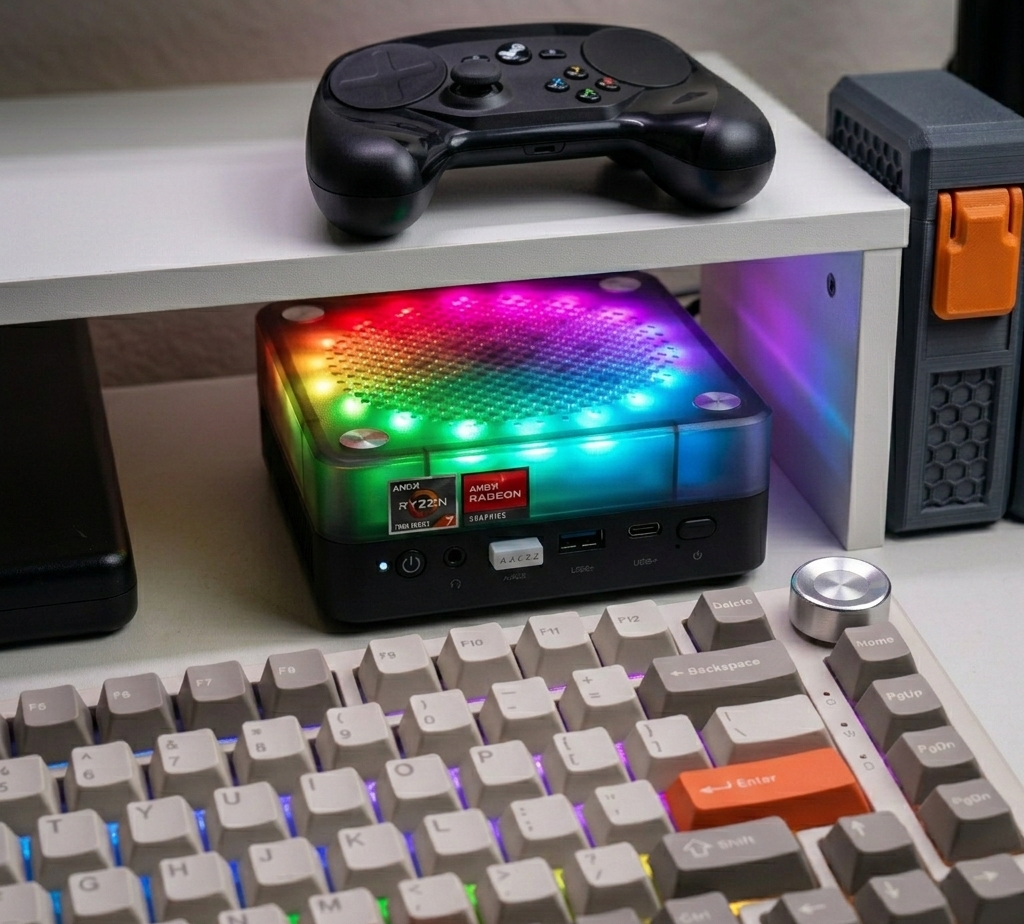
I had some leftover budget from Christmas and my birthday, and the idea of building something like a "Steam Machine Lite" had been floating around in my head for a while. – The alternative would have been a Mac mini M4, but the price difference was just too big to ignore, and a Nintendo Switch 2 would have been the other option, which I probably wouldn't use that often anyway.
Two scrolls, an internal monologue, and a slightly guilty conscience later, it had happened: An AWOW Mini Gaming PC with pretty absurd specs for its size was in my cart.
It packs:
- AMD Ryzen 7 7840HS – 8 cores, 16 threads, boost up to 5.1 GHz
- 32 GB DDR5 RAM – enough to still have three browsers open with 40 tabs each in the background
- 1 TB NVMe PCIe 4.0 SSD – loading times you feel rather than see
- Radeon 780M iGPU – the little integrated GPU that pretends to be a mid-range graphics card
- WiFi 6, Bluetooth 5.2, 2.5G LAN, 4K triple display support
So basically: A very compact brick with serious hardware. Perfect for building my own personal "Steam Machine Lite" – and the whole thing for around €420 total budget.
Note: The following link is an Amazon Affiliate link. If you purchase through this link, I receive a small commission at no additional cost to you.
View AWOW Mini Gaming PC on Amazon →
Bazzite: The Gaming Linux I've Been Looking For
Windows? No thanks. I wanted something that feels more like a Steam Deck and less like "guess which update will break everything today".
The choice fell on Bazzite – a gaming-focused Linux that's visually and functionally heavily based on SteamOS, but runs on a full desktop PC.
Installation: Almost Too Easy
The process was simple:
- Download Bazzite ISO
- Flash it to USB stick
- Boot the mini PC from it
- Click through the installer
- Done
After reboot, I land directly in Gaming Mode – controller-focused, beautiful, organized. Like a Steam Deck in desktop form.
Bazzite Commands: Convenience at the Push of a Button
What's particularly nice about Bazzite:
It comes with its own convenience commands to install typical gaming tools without having to google package names yourself or dig through forums.
Instead of "How do I install XY on Fedora?" it's more like:
"Okay, Bazzite, please set up EmuDeck & co., I'll grab a coffee while you do that."
The command is called ujust and it's basically a meta-installer that automatically installs and configures the most common gaming tools and emulators.
For EmuDeck for example, I just have to type ujust install-emudeck and everything necessary is installed, directories are created, and emulators are pre-configured.
This turns things like emulation setups and additional gaming tools from half a night of googling into: "fire off one command, watch it run, done".
EmuDeck: The Emulation Tower at the Push of a Button
EmuDeck is my emulation hub on this system.
Once set up, I have a clean structure:
- ROM folders sorted by system
- BIOS directories
- Emulators pre-configured
- Optional integration into your game frontend
The wizard takes you through the important questions:
"Which systems do you need?", "Where should the ROMs go?", "Do you want integration into your game interface?"
After a few clicks, the AWOW cube turns into a time machine: from old classics to modern consoles, everything finds its place.
Heroic Games Launcher: Not Just Steam
Of course Steam runs on Bazzite as the main act.
But my game library is a chaotic patchwork rug of Steam, Epic, and GOG.
That's where Heroic Games Launcher comes in:
- connects to my Epic and GOG accounts
- loads in the libraries
- installs games directly under Linux
- uses Proton/Wine in the background without me having to worry about details
- plus you can launch the game directly from the Steam library, making the whole thing even more seamless
The AWOW mini PC becomes a platform that brings together all my digital impulse buys and spontaneous free games under one roof.
Hogwarts Legacy: Full HD with Raytracing – on a Mini PC
Now comes the part where even I was skeptical for a moment, not just because of J.K. (but the game was free): Hogwarts Legacy.
This isn't a tiny indie game, it's a pretty hungry beast. But that's exactly why it's perfect as a benchmark for the Steam Machine Lite.
And – surprise – on the Ryzen 7 7840HS with Radeon 780M it runs for me at:
- Full HD
- very stable
- with Raytracing enabled
Yes, really. Full HD + Raytracing. On a mini PC. Under Linux.
If someone had told me that a few years ago, I would have laughed and continued adjusting my 720p settings.
The combination of:
- powerful APU
- fast DDR5
- Bazzite + Proton
makes it possible. And the result isn't "okay, playable in a pinch", it's "I completely forget this isn't a big tower PC right now".
Walking through the halls of Hogwarts while Raytracing handles the lighting feels suspiciously like "next-gen" – just from a shoebox-sized case.
Switch Emulation with Citron: Zelda at Its Best
Of course I had to escalate on the emulation front as well.
For Switch emulation I use Citron and – no big surprise – I tried it right away with Zelda.
The steps are classic:
- Dump keys and firmware from your own Switch
- Set up Citron and put the files in the right place
- Add the game file (e.g. Tears of the Kingdom)
- Choose graphics backend (Vulkan), tweak a few settings, done
And suddenly I'm standing in Hyrule again – except this time not on the couch with the Switch in my hand, but at my desk or in front of the big TV, controlled with a Steam controller or even mouse and keyboard (really not recommended).
Bottom line: Citron + AWOW + Bazzite = Hyrule on PC, as if the game was meant for it.
Decky Loader: My Cover Gallery
Decky is currently still the quiet roommate on my system.
So far I've used it almost exclusively for cover art and icons of my games.
That sounds like "cosmetics" at first, but:
- beautiful covers
- clean icons
- consistent display in Gaming Mode
make surprisingly much difference to how it feels.
The really wild things Decky can do – performance plugins, themes, UI hacks – I'm saving for later. Right now my little graphical cleanup adventure is enough for me.
Conclusion: €420 for a Serious Steam Machine Lite
When I add everything up, I now have:
- An AWOW Mini Gaming PC with Ryzen 7 7840HS, 32 GB DDR5, 1 TB NVMe and Radeon 780M
- Bazzite as a stable, gaming-optimized Linux with convenience commands
- EmuDeck as my emulation backbone
- Heroic for Epic and GOG games
- Citron for Zelda & co. on the desktop
- Decky to organize everything visually
All of that for roughly €420 total investment.
For me, that's the perfect mix of:
- enough power for modern titles like Hogwarts Legacy in Full HD with Raytracing
- enough flexibility for emulation up to the current console generation
- enough convenience to actually use it – and not just keep it as a "project" in the back of my mind
- on the flip side, I can safely sell my old gaming computer since the old 1050Ti is now obsolete, and invest the money in new games to play on the Steam Machine Lite.
- By the way, the device is much more powerful than my Steam Deck, so I use my Steam Deck as a streaming client for the Steam Machine Lite when I want to play on the couch, which works great too.